DETAIL 01
Find your next tab.
A new-tab dashboard with tab recovery; the official Chrome Web Store listing is still pending.
 // v18.34
planet.X software
Turn Chrome’s new tab into a workspace you can shape, focus in, and recover.
Customize your new tab with dashboards, focus tools and tab recovery. Start with a Pro trial; keep editable Free afterward.
7-day Pro trial · editable Free afterward
Free + Pro
Status: Chrome Web Store submission pending
Software / New Tab Dashboard & Tab Recovery
Customize your new tab with dashboards, focus tools and tab recovery. Start with a Pro trial; keep editable Free afterward.
Why it exists
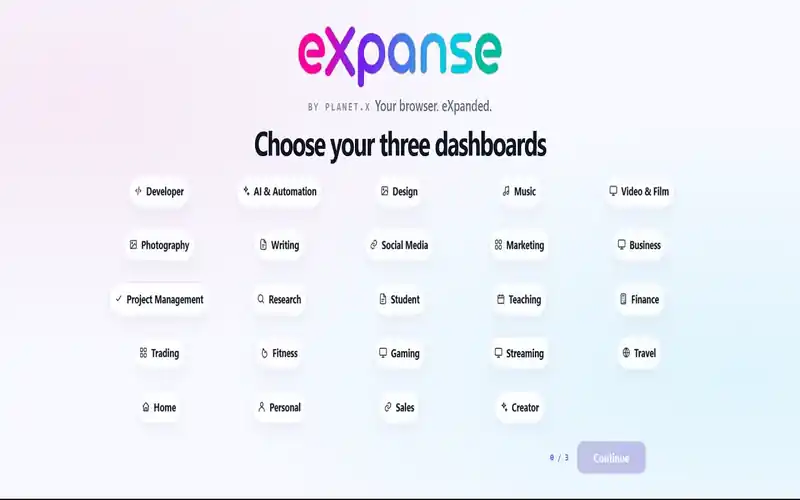
eXpanse turns Chrome’s new tab into a customizable workspace for daily tools, focused work, and browser-context recovery. Choose three starting dashboards from 24 categories, then move and resize widgets across your pages instead of rebuilding your setup every time you switch contexts.
The current release combines local productivity widgets with browser recovery: tasks, notebooks, quick notes, clocks, a local calendar, calculator, photos, Color Studio, Focus Timer, Time Log, optional weather, saved workstations, pinned-state and tab-group recovery, rolling snapshots, Quick eXpanse, and motion-aware Ambient Mode.
The useful details
Customize your new tab with dashboards, focus tools and tab recovery. Start with a Pro trial; keep editable Free afterward.
DETAIL 01
A new-tab dashboard with tab recovery; the official Chrome Web Store listing is still pending.
DETAIL 02
Customize your new tab with dashboards, focus tools and tab recovery. Start with a Pro trial; keep editable Free afterward.
DETAIL 03
eXpanse turns Chrome’s new tab into a customizable workspace for daily tools, focused work, and browser-context recovery. Choose three starting dashboards from 24 categories, then move and resize widgets across your pages instead of rebuilding your setup every time you switch contexts.
24
Starting dashboard categories
7 days
Pro trial on new installs
Local
Workspace + recovery data
What is included
Best fit
Free after trial · Pro when you need more
New installs begin with a seven-day Pro trial. Afterward, eXpanse keeps an editable Free mode and preserves extra trial content instead of silently deleting it.
Free
Pro
New installs begin with a 7-day Pro trial. After the trial, editable Free remains available with three customizable modes, two editable pages per mode, three photos per mode, three recent Time Log sessions, core widgets/basic Ambient, one saved workstation, and three rolling recovery snapshots. Extra trial content stays saved; Pro expands editing, presets, insights, Ambient options, recovery, and workstation tools.
The Chrome Web Store submission is pending. This page will link to the official Chrome Web Store listing as soon as the public URL is verified; no temporary or invented install URL is used.
chris@planet-x.coThe exact current contents are listed above. No unlisted bonus files, fake quantities, or assumed features are included in this page.
The Chrome Web Store submission is pending. This page will link to the official Chrome Web Store listing as soon as the public URL is verified; no temporary or invented install URL is used.
Use the visible planet.X support email above with the product name and the compatibility or licensing question you need answered.
Related products
 planet.X software
Software
Save complete Chrome workspaces, restore windows and native tab groups, recover session snapshots, search saved context, and keep duplicate tabs under control without uploading browsing data to a cloud service.
7-day Pro trial → permanent Free mode
Free
 planet.X software
Software
A local-first encrypted workspace for the API keys, tokens, environment values, notes, and project context developers otherwise lose across dashboards and files.
Chrome extension
Free
 planet.X software
Software
Turn raw mobile, tablet, and desktop screenshots into polished App Store and Google Play artwork with device frames, captions, branded backgrounds, perspective controls, reusable project files, and one-click multi-size ZIP export.
Launch price · secure checkout
$9.99
planet.X software